Show the Map on IDX Broker Agent Bio Pages
Listings load on your IDX Broker agent bio page, but the map stays empty?
Written by IDX Plugin, an independent IDX Broker Developer Partner, not affiliated with IDX Broker.
In short
- One checkbox usually brings the map back on agent bio pages
- Check Agent Bio under Display Map On in IDX Broker Map settings
- If All Results Page Maps is No, set it to Yes and tick Agent Bio
- Save, reload the agent page, and the map should be back
Agent bio pages, the /idx/agent/ pages IDX Broker serves for your account, list an agent's photo, bio and current listings. Sometimes the listings load fine but the column where the map should be stays empty. The most likely reason is that the map is simply turned off for this page type in your IDX Broker settings, rather than anything being wrong with your account or your MLS feed. Start there, and if the setting already looks right, there is more to look at and we are happy to check it with you.
Turn the map back on
-
1
Open Map settings in IDX Broker
Log in to your IDX Broker account and go to Design, then Settings, then Global, and open the Map tab. You can also open it directly at https://middleware.idxbroker.com/mgmt/preferences#map.
-
2
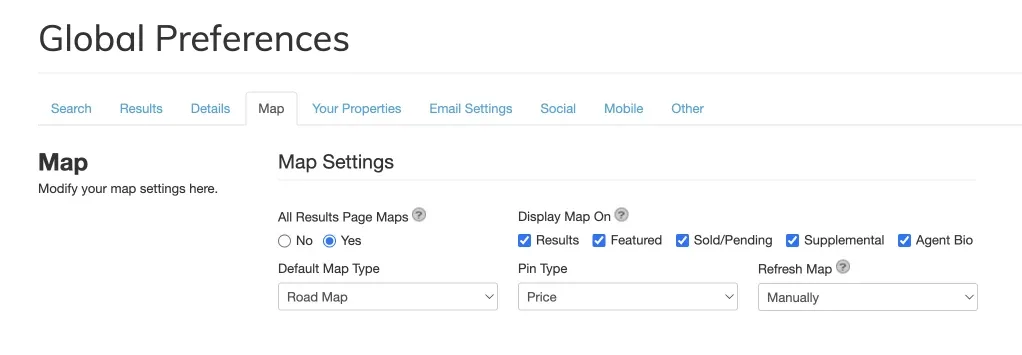
Check Agent Bio under Display Map On
In Map Settings you will see a row of checkboxes labeled Display Map On. Make sure Agent Bio is checked. While you are here, confirm that All Results Page Maps is set to Yes. That setting sits above the individual checkboxes: with it set to No, maps stay hidden everywhere and the individual checks are cleared, so after switching it back to Yes, check Agent Bio again.
-
3
Save and reload the agent page
Save the settings, then open the agent bio page again and refresh it. The map should now appear next to the agent's listings.
Why only agent pages are affected
IDX Broker lets you decide where maps appear. The Display Map On row controls Results, Featured, Sold/Pending, Supplemental and Agent Bio pages separately, each with its own checkbox, and all of them sit under the account-wide All Results Page Maps setting.
Check the result
After saving, open any agent bio page on your account. The map should sit next to the agent's listings, like on this live demo agent page.
Map still missing after saving?
Write to us and we will look at your account with you.
Contact Support Or email support@idxplugin.com