What Is an IDX Broker API Key
The key from your IDX Broker account that lets IDX Plugin work on your own listings, where to find it and what happens once it is added.
Written by IDX Plugin, an independent IDX Broker Developer Partner, not affiliated with IDX Broker.
On this page
In short
- The key lets IDX Plugin run on your own listings.
- It sits in Access Control in your IDX Broker account.
- It is a credential, so treat it like a password.
- Adding it starts your 30-day IDX Plugin test.
What it is
Your IDX Broker account has an API key, on any plan. It is a long string of characters that identifies your account to the tools you choose to connect to it, the way a serial number identifies one specific account and no other. Handing that key to IDX Plugin is what makes the search forms, listing widgets and styling run on your listings instead of on demo data.
The key is not your IDX Broker login and it is not a payment detail, but it is still a credential: treat it like a password and share it only with tools you want connected. It stays inside the two accounts, yours and ours, and it does not go anywhere on your own website.
No IDX Broker account yet? You open your own account through our registration link, we help you pick a plan and set it up with you, with the $100 setup fee waived through us.
Where to find it
-
1
Open Access Control in IDX Broker
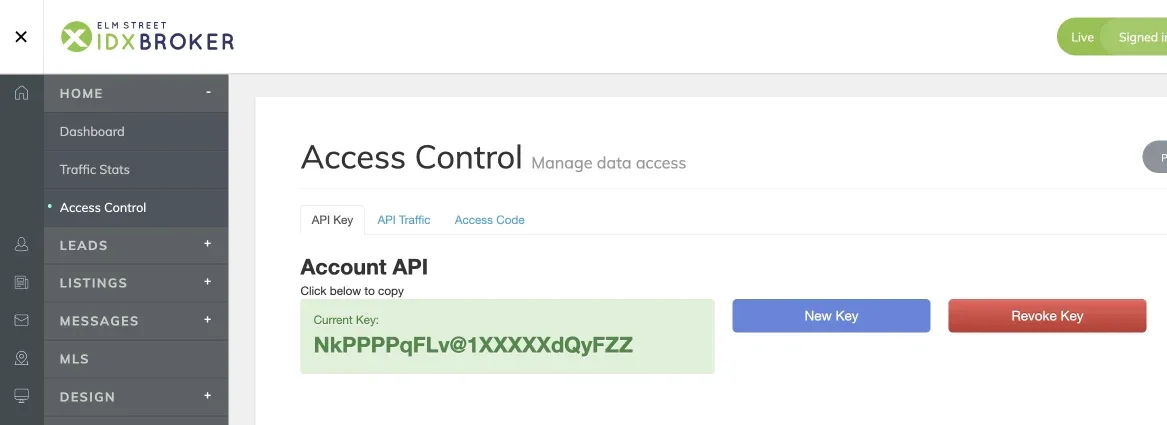
Log in to IDX Broker and open Access Control under Home. The key sits on the API Key tab, under Account API. Clicking it copies the key, so there is nothing to select by hand.
-
2
Paste it in your IDX Plugin account
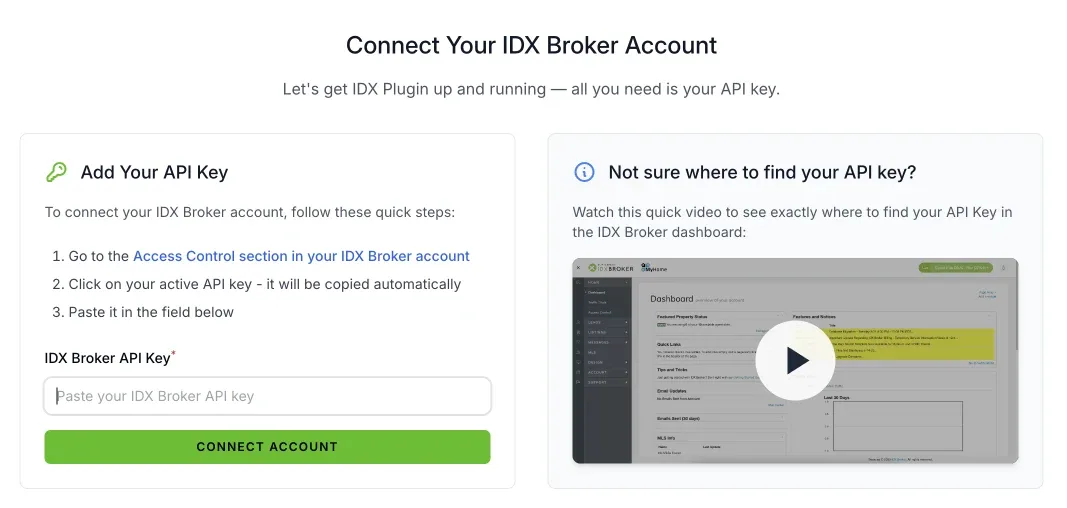
Paste the key into the field on the connection screen and confirm. The screen also carries a short video showing the same path inside IDX Broker.
What happens after you add it
A set of ready widgets appears in your IDX Plugin dashboard, running on listings from your own account, and your Global Styles start applying to them. Nothing changes on your current website until you place a widget on it yourself or ask us to do it, and nothing changes in your IDX Broker billing. What the key alone covers, and for how long, is described in Test IDX Plugin with Just Your IDX Broker API Key.
There is no button for removing the key from IDX Plugin at the moment. If you want to end the connection, delete your IDX Plugin account on the account page in your dashboard. That removes your widgets, data and settings on our side and leaves your IDX Broker account as it is. Revoking the key itself is done on the IDX Broker side.
Not sure which key is the right one?
Send us a message and we will walk you through the connection screen, or set it up with you on your account.
Contact us Support runs by email.